Archive for the ‘Technology’ category

Owning an Electric Car – The Missing Manual

March 7th, 2013

EV_highway_sign_web-280

After much discussion, consideration and research, we made the decision to purchase an all-electric car. (We test-drove both the Nissan Leaf and Chevy Volt back in 2010.) This purchase was made with full understanding of the pricing, the 7500$ Federal rebate, the sales tax exception for electric cars in WA State, and awareness of the limited range of about 70 miles between charges.

Our new car – The 2013 Nissan Leaf ‘S’

The car we purchased was the 2013 Nissan Leaf ‘S’ model. This is a newly-introduced model with a few less bells and whistles than last years car (ex: no navigation system), but a much more palatable MSRP of 28,800$. After factoring in the 7,500$ Federal Tax Credit, no sales tax (for electric cars) in Washington State and by negotiating the price, the car costs less than 20,000$. (The tax savings make it comparable to a gas-powered car costing 18,000$.)

leaf

For the price, you are still getting some higher-end features including keyless entry and start – if the key is in your pocket, that’s good enough to turn on the car. Even without the higher-end navigation features, the ‘S’ model has AM/FM/XM Radio, a perfectly reasonable sound system and Bluetooth hands-free for making phone calls. Besides, most people have a cell phone with navigation capabilities, and this isn’t a car you are likely to take far from home. At the lowest price, you are foregoing the ability to charge the car twice as fast (6.6kW/hr) when plugged-in to a 240v “level 2″ charger or even faster using a “Level 3″ charger, but this is available as a 1300$ upgrade if you need this ability.

Since we rarely drive more than 30 miles in a single day of commuting, we planned to simply charge the car at home with the slower 120v charger which is included with the car.

Owning an Electric Car – The Missing Manual (Pacific NW Edition)

Even if your electric car purchase is well researched, an electric car is a paradigm shift and it takes some adjustment. Even in the Pacific Northwest, electric cars are uncommon, and you will experience the growing pains of a new industry.

1: Comparing the cost per mile to Gasoline

One of the key selling points of an electric car like the Leaf is the potential savings when it comes to cost per mile. It is pretty easy to compare the cost to drive a mile with an electric car and a gas-powered car. (In these calculations, I am excluding other costs of ownership such as oil changes and regular servicing which should be less for an electric car.)

Leaf vs. Prius

Nissan Leaf
The Leaf gets about 3 miles per kWH. At a cost of 8 to 9 cents per kWH in Seattle, the cost per mile is 3 cents.

Honda Civic
While the Honda Fit may seem like a better comparison to the Leaf, I’m being generous and looking at the Civic which gets a little more MPG. With 32mpg and an average price of 3.5$/gallon (It’s currently 3.75$), the cost per mile is 11 cents.

Toyota Prius C
The Prius C is their new entry-level hybrid car, and is almost exactly the same cost as the Leaf after you account for the federal credit and no sales tax. It is smaller than the Leaf and not as nice. That said, it’s the lowest priced car which gets 50mpg. At 50mpg, the cost per mile is 7 cents, still more than twice that of the Leaf.

I also considered the Plug-in Prius and some other electric car options, but they were less cost effective and less appealing.

Total cost to drive 100k miles
The following shows the total cost to drive each car 100,000 miles, which is how far I expect we will drive a commuter car in 8-10 years.

Leaf = 0.03*100,000 = 3,000$ + 20,000$ = 23,000$.
Civic = 0.11*100,000 = 11,000 + 18,000$ (car + tax) = 29,000$.
Prius C = 0.07*100,000 = 7,000 + 20,000$ (car + tax) = 27,000$.

These calculations don’t take into account:

  1. The value of the car at the end of 100,000 years. – I cannot predict the value of the Leaf in 10 years, but I believe it will be near the value of a Prius or Civic.
  2. The cost benefit we would receive by owning a more efficient car (than our Subaru Forester) which does not have the 70 mile range limit. – I can definitely say that a Civic or Prius would have given us a modest savings every year, as we would probably take it instead of the Subaru on a couple of weekend trips. A fair guess is a couple trips each year totaling less than 1000 miles roundtrip, which would cost 130$ in a Subaru and 70$ in the Prius C for a savings of 60$. Over 10 years, we might save 600$ in this manner, but it doesn’t approach the larger savings we enjoy in driving the Leaf on a daily basis as our commuter car.
  3. Preference towards a particular car and it’s features. – I tend to make major purchases based on facts and predictions rather than emotional factors, but let’s be real, nice things are nice. The Leaf is not a “fancy” car, but the interior and features are of a higher-quality than the Prius C, which they clearly stripped down to reach a price point. While the Civic is a comfortable car, we definitely felt like the Prius C was awfully crowded.

As you can see, the Leaf made the most sense for us based on our needs and a detailed cost analysis.

2: Demystifying charging options

In practical terms, a Leaf can drive about 3 miles for every kWH of power stored in the 24kWh battery, for a total range of a little over 70 miles. In other words, it is much faster to deplete the battery than to charge it!

A Level 2 Charger

A Level 2 Charger

Level 1 Charging is what you get when you plug an electric car into a standard 120V electrical outlet. This will recharge your car by 1kW per hour. (In practical terms you can drive 3 miles for every hour it is plugged in.)

Level 1 chargers are limited by standard household wiring and circuits which are generally rated for 15A, which would allow a theoretical 1.8kW of charging. (Watts = Amps * Volts, therefore 15A * 120V = 1800W.) In practice, a car plugged in to a Level 1 charger should expect to recharge about 1kW per hour since these chargers generally only utilize 10A. (There may be other outlets in the circuit which are in use.)

Level 2 Charging is much faster allowing you to charge your car at a rate of up to 6.6kW/hr, Our car is limited to 3.3hW/hr, which in practice means about 10 miles of driving for each hour of charging.

Level 2 Chargers rely on the same 240V electrical output which is used by large appliances such as dryers and ovens. Most level 2 chargers allow cars to charge at up to 6.6kW/h, which is made possible by the use of a 30A 240V circuit. (This has a theoretical output of 7200W based on the same equation. Some homes are actually wired as 110V/220V, which would have an theoretical limit of 6600W on a 30A circuit.)

After only a couple days with the car, we are considering a level 2 charger at our house. There is a 30% federal credit to buy and install a charger, which should put the cost under 1000$.

3: Charging ‘Networks’

Living in the Pacific Northwest, you have probably seen special parking spots for electric cars at the store or at the mall. One might naively assume that these charging stations are free to use as an incentive to shopping at that location, and in some cases you would be right, and in other cases you would be badly mistaken.

charging networks

As it turns out, the vast majority of public charging stations have been built with the ability to charge based on a fixed rate for each hour or for each kW of charging. Unfortunately for electric car owners, very few of these stations simply take a credit card like a gas station. Instead, you must become a member of their particular “charging network” in order to recharge your car. (ex: Imagine if each gas station required a special credit card that only works at their gas stations. If you desperately needed gas and the nearest station was of the wrong type, you would be unable to fill up your car.)

Thankfully, in the Seattle area there are only two major networks which cover the majority of charging locations. If you want the flexibility to use these stations due to unexpected changes to your driving plans, you will need to create an account with both networks and carry multiple RFID cards to use any charging station you might encouter.

  1. ChargePoint has 11,096 charging stations nationwide (at the time of this article). They leave it up to the station owner to determine pricing. Some stations are provided free of charge to ChargePoint members (ex: City of Kirkland or Bellevue), and others have fees ranging from a fair price of 2$ for up to 12 hours at City of Seattle to an outrageous price of 2$ per hour at Bellevue Square Mall. Chargepoint also has an annoying policy where you must make an initial deposit of 25$ before you can use any stations with a fee. This makes it hard to justify as a solution to only use as a backup.
  2. Blink Network has 1252 charging stations nationwide, and many of these stations are located in Seattle and Portland. All Blink stations offer the same pricing of 1$/hr for members and up to 2$/hr if you are not. Their membership fee is 30$, which doesn’t include any charging at all, but the fee is being waived at this time for new customers. This pricing is very poor for people like me who can only charge at a rate of 3.3kW/hr. (At 1$/hr they are charging 30 cents per kWh, versus 9 cents per kWh at home.)
  3. There are a few more networks which may be useful if you venture outside of Seattle or Bellevue such as AeroVironment, who has stations in Snoqualmie, Burlington, Skykomish and Leavenworth. (I believe these stations are free, but I’m not sure.) Semacharge stations are installed outside 17 Walgreens stores in our area, but all SemaCharge are currently free and do not require a membership. OPConnect may be relevant if you want to visit Portland.

4: Living with limited range

With a gasoline-powered car, you have the luxury of only looking at the gas gauge every once in a while. By contrast, you need to pay close attention to the battery level and projected range in an electric car. This can cause some drivers to develop range anxiety.

In our limited experience, it seems like the easiest way to manage the limited range is to consider your whole trip before you leave the house. In our case, I have a 6 mile (each way) commute and my wife has a 11 mile commute (each way). Since either commute is well under 25 miles total, we have 40+ miles of wiggle room to add a trip to the gym, to the store, or other unexpected destinations. In the rare instance where we need to exceed that range in a single day, we would leverage one of the many free or paid charging options called out earlier. We own two cars, so we can always switch cars if we need to drive further than that in a day.

I plan to offer more details of our experience living with an electric car sometime soon. If you have any comments or questions, leave a message below!

ADDENDUM 3/7/2013: I have received some clarifying information on both the circuitry required to install a Level 2 Charger (it should be a 40A circuit) and the energy loss associated with charging a battery which needs to be factored into costs and calculations. I plan to update this post later to clarify a few of these details.

Major Update to the National Park Service Checklist app

August 10th, 2011

I’ve completed a major update to my National Park Service Checklist application, adding the ability to view and record your visit to all of the sites in the National Park Service.  This includes the many National Monuments, Historic Parks/Sites, Battlefields, Recreation areas and more… nearly 400 sites!

I’ve also taken the time to introduce a new home screen, leveraging the horizontally scrolling “Panorama” control which are a core design pattern for the Windows Phone.  This makes it easy for users to see just those sites of a specific designation (ex: monuments) or region.  I show your progress against each of these areas, so you can see how close you are to visiting just the 58 national parks, or visiting every site in the National Capital Region.

As always, this is a free upgrade for existing customers.  I have kept the price low as an introductory offer, just 1.99$, although this may change as I have added so many new features in this update.

Download this app: If you have Zune app installed on this PC, or are viewing this page on your Windows Phone, visit http://windowsphone.com/s?appid=358c0575-ad86-e011-986b-78e7d1fa76f8 for a free trial, or to purchase this app.

Version 2.0 adds:

  • All of the sites in the National Park Service, totaling 385 sites.  (395 if you count park + preserve twice as the park service does.)
  • A bold new home page with photos for the most common designations, plus a page to view sites by region w/ an region overview map.
  • Dynamic “places” view to show all of the sites of a specific designation or region, plus progress (28/58 visited) and brief description of purpose of designation.
  • Progress indicator when loading the app and when viewing every park of a type or in a region.
  • A short description about each park service designation to help visitors understand how they differ. (Ex: historic park vs. site)\
  • Moved “learn more about the NPS” to a separate page to simply home screen.
  • Updated icons and loading screen.
  • (Trial mode is limited to viewing the 58 national parks, and recording your first three visits.)
P.S. This weekend we visited Channel Islands National Park, camping for one night at Scorpion Harbor on Santa Cruz island.  We had a beautiful day hiking to Smugglers Cove, and the next day we hiked out to Potato Harbor before catching our boat back to the mainland.  This trip, plus our July visit to Cuyahoga Valley brings me to 28 of the 58 National Parks (I’m almost halfway there, although we’re only visited 13 parks together.)

Introducing the ‘National Park Checklist’ app for the Windows Phone 7 platform

May 30th, 2011

I’m pleased to announce my second app for the Windows Phone 7 platform.  The application follows in the footsteps of Fifty States app, offering a crafted application experience for tracking your visits to the 58 US National Parks.  As you may have seen in my earlier post about creating a National Park Checklist wall poster, I have incredible appreciation and passion for these protected lands which have been set aside due to their unique natural and cultural beauty.  I’ve created this app to help you engage with the parks more fully, track the places you’ve been, and inspire your next adventures.

Home Screen showing the parks you have visited. (Photo of Capitol Reef taken by me.)


New features in the ‘National Park Checklist’ app.

The National Park Checklist application was built using my Fifty States app as a starting point.  Since that application’s initial version 1.0 release, I have made many updates which set the stage for me to create a similar application for the National Parks.  In both apps, I now read the state/park data from an XML file, which makes it easier to do the initial data entry and to make updates should I want to add additional capabilities which require more data fields, or to simply fix a mistake in the data.  Along the same lines, I am now saving/reading user data to a defined XML schema instead of relying on the IsolatedStorageSettings API.  This allowed me to introduce a feature to “back up” your visits data.  I plan to introduce an option to restore the data soon :-)

I am particularly pleased with the visual styling I was able to achieve with the National Parks app.  I definitely drew inspiration from the National Park Unigrid System that is used in official park literature.  It relies on a bold black heading with white text on all materials, and aligning content to strict grids to ensure readability and consistency on literature which is folded.  I’ve incorporated photographs (taken by me and my wife) of many national parks. which provide a random heading for the home page, and provide context when looking at a specific park such as Haleakala (see below.)  I hope to get additional images for the remaining parks.

I also color-coded the National Parks by region to give users a way to break the insurmountable goal of visiting 58 disparate parks into more achievable goals.  The color coding was carefully selected to match the coloring used in the ‘Passport to your National Parks’ program.  I have owned a National Park Passport since ’92 and nearly filled several sections during several family road trips starting in ’93.  The program is a great way to motivate people to visit the parks and have a stronger connection with each visit.


Try it now…

If you have a Windows Phone 7 and would like to try my application, please click this link to Download the National Park Checklist application using the Zune Marketplace for Windows Phone 7.  If you like it, please rate the application and leave a comment on the marketplace.  This will help others find and enjoy this application.

As always, please send me an email or leave a comment below if you have questions, ideas, feedback or bugs for me.  Thanks!


A Gaggle of Geese, a Tangle of Technology…

January 9th, 2011

I love to travel, and I get a lot of pleasure out of having the right tools to enjoy my trip, and to document the trip in a variety of ways.  This Christmas, we went to New Zealand, and we wanted to bring our cameras, a phone, mp3 player, Netbook, and a GPS, but we ended up with a heavy tangled mess of adapters, wires, chargers and batteries.  I stuffed it all in a mesh bag to make sure I didn’t lose anything.

What went wrong in the Electronics industry to leave me in this situation, what can I do better next time, and will this ever get any better in the future?

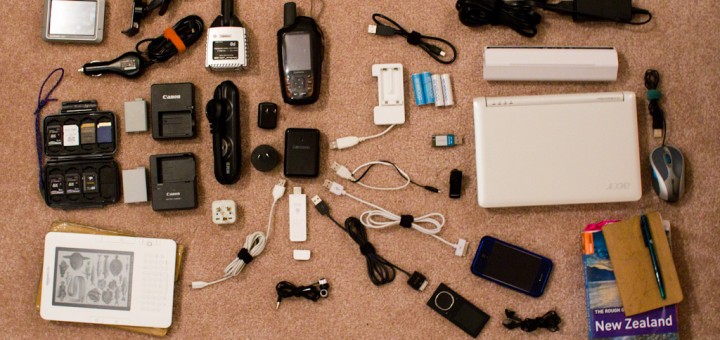
Products, accessories, cables and Adapters required to travel with Technology.

The devices, accessories, chargers, cables and adapters we brought on our trip. (cameras & lenses excluded.)

What to bring?

Part of my problem is that each of the technology items I travel with are excellent at a single thing, so I end up carrying many single-use items like a dedicated GPS or a standalone MP3 Player.  What follows is a breakdown of the items I brought with me on our two-week holiday trip to New Zealand, and an assessment of  how everything worked out and how I might do it better next time.

Cameras: This  includes the cameras themselves, and a small collection of lenses we share between two cameras.  For this trip, we brought 4 lenses for our Canon Cameras: Canon EF-S 10-22mm F3.5-5.6 Wide Angle Zoom Lens, Sigma EF 30mm F1.4 Midrange Prime Lens, Canon EF 100mm F2.8 Prime Macro Lens, Canon EF 70-200mm F4L Telephoto Zoom Lens.  (The majority of our photos were taken with the 30mm Prime which is excellent and sharp, and the 10-22mm Wide which continues to be soft and disappointing.)

Beyond the Cameras and Lenses, we brought enough memory cards such that we did not need to download and reuse them on the trip.  (A total of 128gb in SD Cards of capacities ranging from 4-32gb stored in a sturdy Pelican case).  This was more than enough storage, especially due to poor weather which limited our shooting.  We also brought a spare battery for both cameras, and the charger for each camera since they are slightly different.  We also carried a lens cleaning pen, and a Mini USB cable to download photos at night.

Geotagging: Beyond the photos themselves, I enjoy GeoTagging almost all of my photos.  This associates an exact location with each photo, allowing you to see where each photo was taken on a map.  Since very few cameras actually include a GPS unit, the main way to do this is to carry a handheld GPS unit wherever you go which records your location every few seconds as digital breadcrumbs, called a Tracklog.  Later, a software program on the computer can compare the timestamp of each photo you took that day to the Tracklog to determine exactly where the photo was taken.  This works best with a high-precision GPS that has excellent battery life.  In my case, I use the Garmin GPSMAP 62s, which is extremely accurate, reasonably lightweight and also has the ability to show detailed topographic maps of your current location.  I made sure to download the high resolution Topo Maps for all of New Zealand before we left home, which prevented us from having to buy costly maps in preparation for our hikes.

Ofcourse, another device means additional accessories.  The Garmin GPS uses standard AA Batteries, which would be great, except I needed two batteries per day.  To achieve this knowing that we wouldn’t be able to charge them every night, I needed 6 batteries in total and a compact charger.  I use the excellent Sanyo Eneloop rechargeables to save money and I found an Eneloop-branded charger on Amazon that charges two batteries in 6 hours from a USB port.

Auto GPS: Beyond the Handheld GPS which recorded tracklogs and went with us on hikes and walking around town, we brought a dedicated Automotive GPS with “Routable” maps of New Zealand.  We learned travelling in the UK and Ireland that a GPS can save incredible amounts of time and frustration fiddling with maps and trying to keep track of where you are and where you are going.  We continue to use a 3 year old model, the Garmin Nuvi 200 because it still works fine and accepts current maps for all over the world.

It includes a suction cup mount to attach it to the window and as expected, it requires a proprietary car charger that plugs into a serial port.  It is particularly bulky, and frustrating as the device uses a USB port, but refuses to charge with anything other than the special charger.

Phone & Entertainment: Another set of gear came with us to help pass the time and serve other roles.  We each brought an MP3 player to help with the long flights and provide variety while driving.  I brought my unlocked iPhone so we could buy a SIM card if we liked to make reasonably priced calls.  Amy also brought her Kindle, as it is much more compact than the stack of paperbacks she used to travel with.

All four of these devices charge off of a USB Port, but all but the vintage iPod Shuffle  have proprietary connectors.  (The iPhone and Zune are inexcusable, but the Kindle should be commended for using the standard Micro USB cable.)

Laptop: To back-up our photos, entertain me on the flight, and watch a couple movies, we brought an Acer netbook computer which is extremely small, and I was able to upgrade it’s hard drive to a whopping 500gb.  I put 100′s of movies on the computer before leaving home including a couple of Christmas movies.  Even with it’s modest Atom CPU, it was able to play standard definition movies, browse the web or using Google Voice to call our families.  Backing up photos was a little sluggish as Adobe Lightroom does not do well on slower machines, and tagging/reviewing photos was almost unbearable.  A couple times I tried to develop a photo, but this was too slow to recommend.

The laptop was one of the worst offenders in terms of bulky accessories.  The Power Adapter is very large with an unnecessarily long cord, the extended battery gave us 8 hours of battery life but is very bulky and heavy, the mouse is nice to have but additional bulk, since it lacks integrated bluetooth we had a USB Bluetooth adapter, plus a Bluetooth headset and charger to make phone calls.

What happened?

There are a variety of problems at play here.  As noted, most small consumer electronics have settled on USB to charge, but at this point, each one uses a different cable to connect on the device end:  Kindle uses a MicroUSB connection, iPhone and Zune use a proprietary connectors, my old iPod Shuffle uses the larger standard USB connection.  The proprietary connectors are caused by the manufacturer’s desire to sell accessories that would not be practical with only the 4 wires contained in a USB Cable.  Accessories and replacement cables are likely profitable!  (Even the tiny bluetooth headset charges from the same 5V that the rest of these devices use, although it was sold with a bulky wall adapter which I cut off and soldered to a standard USB Plug.  That’s for a later article.)

As for the Cameras, Laptop and Handheld GPS, each has their own story.

It actually makes sense that the Laptop charger is reasonably large.  It likely has a large AC/DC converter, and this creates heat which needs to be dissipated.  As this laptop is an inexpensive netbook, they sure aren’t motivated to use the smallest or most efficient components, and I’m sure the unnecessarily long cable was inexpensive, and less customers are likely to complain with a cord that is too long than too short.  All that I ask is that they use a shorter cable from the wall to the adapter, since this is the heavier and thicker section of cord, or put the plug right on the adapter itself.

Why two cameras from the same manufacturer need a different battery is excusable.  My camera added video recording feature which can use a lot of power so they used a larger battery.  That said, there is no reason they couldn’t make a taller battery for my camera which uses the same connection to the charger as her older battery.  One less charger would be a tremendous savings.  Further, I would accept a slow charge over a USB connection.  Since both cameras include a USB port, they should offer the ability to trickle-charge the battery overnight when plugged in.  This woudl allow me to leave both chargers at home.  (I suspect this is not offered due to concerns of overheating the battery, a charging battery leaking inside the camera, or the few additional components they would need to put in the camera to make it work.)

The Handheld GPS is the most forgivable of the bunch.  It relies on standard AA batteries.  A built-in battery would be a mistake since you cannot replace it while on the trail, and proprietary batteries would be more expensive for customers and would likely still require a separate charger.  Again, I think it would be a great feature to allow slow-charging of the AA Batteries when connected to a powered USB source, but this is a little less expected of a niche product than a mainstream product like a camera.

Next Time…

In the long term, we may see the situation improve as the European Union has pressured phone manufacturers to standardize on MicroUSB chargers. (right in the image below)  I suspect that this will continue beyond phones to influence all consumer electronics devices (Mp3 players, bluetooth headsets, GPS devices, E-readers) as economies of scale should make it the cheapest charger on the market, or device manufacturers may decide that they don’t need to include a charger if customers already own one.  I can’t wait for the day where a single cable can sync and charge all of my devices!

If I can’t have a single cable which works for everything, a smaller step manufacturers can take quickly is to include shorter cables with their devices.  Most customers would be happy with a 12″ cable, and I actually got a cable of this length with a recent portable hard drive purchase. I would love to have even shorter 3″ cables for each device, but anything shorter than 2 meters is an improvement!

While I wait for more devices to follow the same standards, I have called out a few changes I can make next time:

  • Either buy a third camera battery and leave the chargers at home, locate a universal charger for multiple camera battery types, or upgrade one of our cameras such that they use the same battery and charger.
  • Leave the 4-outlet USB adapter at home.  It worked great for charging many devices off a single outlet, but I could just as easily charge them off the many USB ports on the laptop.
  • Replace the 4-electrical outlet splitter with a much more compact splitter.  It is really useful to turn one outlet into two, but creating four is rarely critical.
  • Upgrade to a slightly larger, more powerful laptop, and leave the second battery at home.  The soon to be released Lenovo x120e with a 11″ screen (399$) looks like a great option for less than half the price of the new 11″ Macbook Air.  I don’t need a second battery, since in-flight entertainment coupled with sleeping medicine makes a 13 hour flight turn into a movie with dinner, sleep time, then a second movie with breakfast.  (When we needed to use the laptop during the trip it was for short bursts of time.  We were able to recharge it in a hotel, backpacker or in the car before it was depleted.)  P.S. An Included bluetooth adapter would eliminate another dongle.
  • Consider leaving the MP3 player behind and relying on the phone for music.
  • Explore using GPS software on a smartphone instead of a dedicated Auto GPS.
  • Download travel guidebooks for the Kindle (or smartphone) and leave the paper guidebook at home. (If this works well, one of these Moleskine Notebook + E-reader cases would be a great travel setup.)

Overall, I am happy with the equipment we brought and the optimizations we made before we left home.  That said, this was a timely opportunity to review what worked well, what didn’t, what we used a lot and what we could have left at home.

It’s Electric! (boogie woogie woogie)

November 15th, 2010

This month, we got the opportunity to test two of the front-runners of the race to build and sell a mainstream plug-in electric vehicle.  Both cars were designed  with different tradeoffs in mind, and each is being brought to market with a different strategy.  What follows isn’t a formal review, but my take on the cars based on very limited experiences with each vehicle.

Get familiar with this plug as it will charge your next car

Overview & Pricing:

The first car we tried was the Chevy Volt, an expensive (40,280$ – 7,500$ federal credit = 32,780$) 4-seater designed around a smaller battery back with a 40 mile range and a gas generator to extend the range several hundred miles.  It has a jellybean-shaped exterior which is very similar to the Prius and a spaceship interior with tons of bells and whistles that remind you at all opportunities that you are driving a “green” car.

Getting under the hood of the Chevy Volt

Today we participated in a test drive of the Nissan Leaf.  It is priced starting at a more reasonable 25,280$ (32,780$ before the 7,500$ federal credit).  It’s exterior is more “budget hatchback” than “Prius ripoff” but it still features the vertical column of clear plastic  on either side of the rear door which has grown to mean green.  The interior is more modestly appointed, with an interior that I found more familiar and much less distracting.

The Leaf is a basic-looking small car

The Leaf is the obvious winner as it is 7500$ cheaper. It also may be cheaper to maintain as it has no combustion engine and needs no oil changes.  The Leaf relies more on a high-voltage charging station in the home as it takes 20 hours to charge fully on 110 volt, versus 8 hours with the special charger.  With the smaller battery, the Volt doesn’t take as long to charge fully.

That said, it is impossible to predict the maintenance costs of a new technology.  (Both have comparable warranties on the battery system at around 8 years or 100k miles, which is good to know, but I expect more than 8 years of a car so only time will tell.)  On the pricing front, I understand but haven’t confirmed that these cars are exempt from state sales tax, which brings the effective cost of the car as compared to a traditional gasoline car down by another 2-3 thousand dollars.

Design Concepts and Marketing Strategies:

At it’s core, the Chevy Volt is a hybrid car like the Prius, with a slightly larger battery pack and the ability to plug it in to the wall.  It was presented cautiously, as a car with no weaknesses and the ability to drive 40 miles a day without using any gas.  They felt defensive about this design decision, and didn’t miss an opportunity to remind us that pure electric vehicles have a limited range.

The Leaf was designed from the ground up to be an all-electric vehicle for everyday use.  It was presented in today’s demonstration in a direct an unapologetic fashion.  They explained that most people can drive around town all day with a range of 100 miles, and if that isn’t enough, rapid charging stations are getting built on highways and at the places you shop.  I felt like the clarity of purpose made for a stronger position.

Interior:

Apart from the different power systems, each car took a different approach to the interior and overall driving experience.

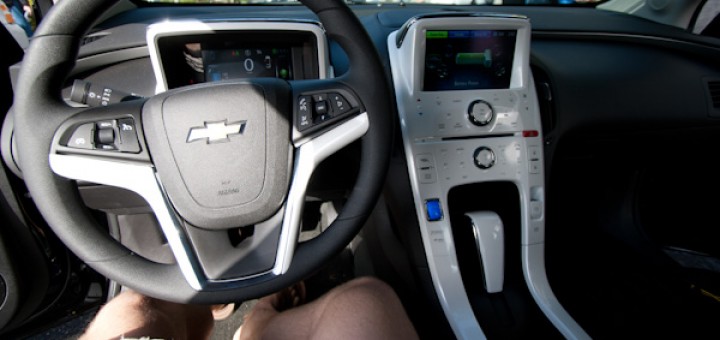
I’ll say it up front rather than dancing around the matter: I hated the interior of the Volt.  It felt like a spaceship with a shiny white plastic center console with a massive touchscreen dominated with excessively “green” icons and menus.  Despite the shiny veneer, the buttons felt cheap with an incredibly annoying interaction design: The physical buttons which surround the touchscreen respond to touch, not clicking.  As such you cannot feel your way around the dash to change the station, since merely touching the button will change the station.  It was all made worse by the fact that I expect a car with a final cost of over 30k to have a refined, polished and professional build quality, like that in a BMW or other expensive cars.  Lastly, the placement of the battery in a column down the middle of the car means that it is strictly a 4-seater.  It’s not that it would be comfortable to carry 5 in either car, but the flexibility is nice.

The interior of the Volt was distracting and felt cheap

By contrast, the Leaf’s interior did little to impress or offend me.  As a driver of a 12-year old car that has a fairly spartan interior, I am used to a car with fairly basic controls and displays.  The dashboard was straightforward with the expected battery gauges, speedometer and a nicely understated indicator of your driving efficiency.  The plastic interior detailing felt solid, though lacking in the aesthetic appeal of polished plastic, metal or wood.  The included navigation system and touchscreen was straightforward and responsive.  It will no doubt feel dated in 10 years, but hopefully by then you won’t need a special map to find a place to plug in your car.  Overall, as a car driver and not a car nut, the interior features aligned with my expectations of a car in this price range and appealed to my preference for function before form and features.

The Leaf has a clean and simple interior with less distractions

Conclusion:

Chevy is trying very hard to market the Volt as a Plug-in electric vehicle with no limits, but it felt like they wanted it to be everything to everyone and ended up building a car that isn’t great at anything and costs too much.  By contrast, the Leaf is marketed as a convenient 100% electric car for getting around town without a lot of fuss.

I think Nissan is right.  We all know what makes an electric car great: cost savings and lessened environmental impact.  That’s why they focused their energy on two things: Making a great car that feels like a car first, and explaining how you can fit it’s need to be plugged-in every 100 miles in to your existing lifestyle.

http://www.nissanusa.com/leaf-electric-car/index#/leaf-electric-car/indexT

Finally, the perfect game for my Phone.

March 3rd, 2010

Everybody seems to be getting a touch-screen phone these days.  They are generally able to make calls, browse the web, play games and more.  In my case, I have an iPhone, and I primarily use it to read my email, check my calendar, read facebook or browse the web.  I have lots of free games, but hadn’t found any games that really engaged me.

Rush Hour is a simple puzzle game that I have seen for years in toy stores and game shops.  It has a simple premise, you need to solve challenges where you arrange the plastic cars on a grid as indicated on the challenge card.  Then, by only moving the cars forward and back, you need to free a path for the red car to slide out of the traffic jam.  It’s basically a 2d mashup of  a Rubik’s cube and Tangrams.  It’s deceptively simple to learn, but the trickiest challenges take some time.

I realized this would be a great iPhone game right when I got the phone and tried an assortment of free games.  Many were fun, but very few kept me engaged for more than a few minutes.  Rush Hour seemed an obvious game for the touchscreen device, but when I looked, it wasn’t available.

Thankfully, they have realized the opportunity and made this time killer available for the Phone.  A free version offers a couple hours of enjoyment, and the pay version promises many more challenges.  I like how the game tracks your movements and you can try to solve the puzzle with the fewest movements if you like.  

Phone adaptations of more complicated games I enjoy such as Settlers of Catan enver made any sense to me, I don’t play board games to have a private experience on a small screen, I play to have a fun time with friends.  Games for the phone should be easy to pick up, easy to stop anytime and fun.  Rush Hour has met all of these goals.   It makes bathroom time and time spent waiting around much more fun!

Low-cost, highly personal iPhone Case.

October 29th, 2009

I got a used iPhone from Lisa, (Thank you!) and I have been enjoying the device quite a lot.   In short, it’s a great “lifestyle” device but a so-so phone.  That is a reasonable tradeoff for me, since i make relatively few calls.

This phone is the first generation iPhone, so I don’t get a GPS, or fast 3g data. It also has a crack in the digitizer, but it is in the lower-left corner and not very distracting.  (The digitizer is the glass pane above the screen itself which receives the touch inputs.  On the new iPhone, this is  separate 15$ part that you can replace with some saavy, on this generation, it is glued to the screen itself, so a replacement would cost 100+ dollars, which I am not convinced is worth it.)

I ordered a charging cable online, since I wasn’t that concerned about how the charger looks and feels in everyday use, but I wasn’t really interested in buying a 30$ case for the phone, and the 5$ cases look pretty lousy.  That said, I didn’t want to break the device before buying a case.

I gave myself 10 minutes the other day after lunch, to fashion a makeshift case out of the cardboard backing to an empty legal notepad. I placed the phone face-down in the middle of the cardboard, and traced the outline of the phone.  I drew a circle roughly where the home button is, a big square for the screen and a slit for the speaker, and cut them out with an x-acto.  I made slits at the corners with a pair of scissors, scored the four edges and folded it around the phone.  A couple pieces of scotch tape finished the task in a total of 7 minutes.  The holes for the volume, docking port and camera came later, as did the personalized front plate which was implemented with ink and sharpie.

This was easy and fun, and the case is extremely replaceable.  It has even proven itself already in a 2 foot fall (Sean!) onto a hard table.

Free upgrade to your Canon Point-and-shoot Camera

October 14th, 2009

A quick primer on Digital Cameras:
Most folks who get seriously interested in Photography eventually upgrade to a Digital SLR Camera.  These bulky cameras have a number of features that a cheap point-and-shoot lack:

  • The most obvious difference is the ability to change the lens based on what you are trying to photograph. 
    Some folks make do with a single lens which will be good at everything, but great at nothing.  We carry three lenses at the moment; each is great at something different. (The 10-22 is very wide, the 30mm is fast and sharp, and the 70-200 can zoom and is also very sharp.)
  • One of the other important features of a Digital SLR is that the sensor which gathers light and creates the digital image is comparably large. 
    The sensor of a point-and-shoot is about the size of a tic-tac, whereas the sensor on a SLR is about the size of a postage stamp.  This gathers much more light, and leads to a sharper image with less noise.
  • The last big difference is the ability to shoot in RAW format. 
    Cameras record anywhere from 10-16 bits of information for each pixel in the photo, but when you convert the image to the standard JPEG format, you are limited to 8 bits of information for each color/pixel.  If this conversion occurs in the camera, you get easy to use JPEG files on your memory card, but you cannot go back to the original data if you want to make changes to the brightness or the color balance.  There is no technical reason preventing a cheap camera from saving photos in RAW format, but rather they do not offer this option as it drives sales of higher-end cameras.

So, how do I upgrade my Canon point-and shoot camera?
This is where the hard work of a community of hackers comes in with a program called Canon Hack Development Kit, or CHDC.  They have put together a hack which allows a inexpensive Canon Point-and-Shoot camera to do many things that Canon did not intend.  The most significant new feature is the ability to save yoru photos in RAW format.

I installed their software on my camera and fought through their poorly-designed menus to set it up, but it really works.  I shouldn’t overstate the value of saving RAW images from a low quality camera. There is only a little extra data to work with in these RAW images, and the resulting files are significantly larger than their JPEG counterparts.  The excitement is further weakened by the fact that you have to run a crappy utility (DNG4PS2) on your PC to convert these RAW files into .dng files which are compatible with popular software such as Lightroom.

Update (8:29pm)
I wanted to see if the RAW files from my camera actually contained extended dynamic range compared to the camera JPEG, so I did a quick test.

The images below are crops from an overexposed portion of a photo taken on my Canon SD630.

Image 1. This is a crop from the unmodified in-camera JPEG.
Image 2. I took the in-camera JPEG and decreased the exposure in Lightroom, -4.00
Image 3. This time I applied the same -4.00 exposure to the RAW image.
As you can see, there is definitely additional information in the RAW image which was lost as pure white in the JPEG.

Netflix’s Secret Weapon: The Schindler’s List Effect

September 24th, 2009
This summer, we found an unusual occurence: all of our friends had a copy of Schindler’s list on loan from Netflix at the same time. We all had received the film some time ago and refused to watch it,but we also refused to return it.

The secret behind this film’s importance to the Netflix company is complex:
  1. It is undeniably a fantastic movie, so it is a common movie to add to your queue, since the Netflix algorithms are pretty sure you will give it 4 or 5 stars too.
  2. It is a gut wrenchingly sad movie that nobody actually wants to see.    (It’s different to want to have watched something than to roll into the house after a long day and want to watch this film.)  Remember, it’s also two DVD’s long. This isn’t even an efficient mechanism to cause self-inflicted depression.
  3. The subject matter (holocaust) is so emotionally loaded, that we feel guilt about the fact that we don’t want to watch the film.  This may play into why we refuse to return it unwatched.

Net Result: We refused to watch or return it.  It clogs up everyone’s queue at a cost to Netflix of $14.99.  This treacherous film clogged our low-cost 1-at-a-time netflix queue completely for four months.  At the end of the day, we paid (4 x $4.99 = $19.96) to neither watch nor own this movie, and feel guilty about it too.

I wonder what other movies in the Netflix Catalgoue exhibit the Schindler’s List Effect.